• Skip to content
  • Skip to primary sidebar

Header Right

  • Home
  • About
  • Contact

admin

10 Tips for Better Budgeting…

October 25, 2020 by admin

Business team busy at work…and how QuickBooks Online can help you with the mechanics.

If you already have a budget, it’s probably been difficult for you to stick with it for the last several months. Unless you provide products and/or services that have been in great demand since the COVID-19 pandemic took hold, you’ve had to adjust your budget significantly.

Better days are ahead, though, and now is a good time to start doing some planning for 2021. While there are still likely to be uncertainties next year, creating a budget will give you a starting point. A budget increases your awareness of all of your projected income and expenses, which may make it less likely that you’ll find yourself constantly running short on funds.

Here are some ways you can make your budgeting process more effective and realistic.

Use what you already know. Unless you’re starting a brand-new business, you already have the best resource possible: a record of your past income and expenses. Use this as the basis for your projections.

Be aware of your sales cycle. Even if you’re not a seasonal business, you’ve probably learned that some months or quarters are better than others. Budget conservatively for the slower months.

Distinguish between essential and non-essential expenses. Enter your budget items for the bills and other expenses that must be covered before you add optional categories.

QuickBooks tips

You can use data from a previous year to create a new budget in QuickBooks Online.

Keep it simple. Don’t budget down to the last paper clip. You risk budget burnout, and your reports will be unwieldy.

Build in some backup funding. Just as you’re supposed to have an emergency fund in your personal life, try to create one for your business.

Make your employees part of the process. You shouldn’t be secretive about the expense element of your budget. Try to get input from staff in areas where they have knowledge.

Overestimate your expenses, a little. This can help prevent “borrowing” from one budget category to make up for a shortfall in another.

Consider using excess funds to pay down debt. Debt costs you money. The sooner you pay it off, the sooner you can use those payments for some non-essential items.

Look for areas where you can change vendors. As you’re creating your budget think carefully about each supplier of products and services. Can you find less costly alternatives?

Revisit your budget frequently. You should evaluate your progress at least once a month. In fact, you could even start by budgeting for only a couple of months at a time. You’ll learn a lot about your spending and sales patterns that you can use for future periods.

How QuickBooks Online Can Help

QuickBooks Online offers built-in tools to help you create a budget. Click the gear icon in the upper right corner and select Budgeting under Tools. Click Add budget. At the top of the screen, give your budget a Name and select the Fiscal Year it should cover from the drop-down list by that field. Choose an Interval (monthly, quarterly, or yearly) and indicate whether you want to Pre-fill data from an existing year.

QuickBooks tips

QuickBooks Online supplies a budget template that already contains commonly used small business items.

The final field is labeled Subdivide by, which is optional. You can set up budgets that only include selected Customers or Classes, for example. Select the desired divider in that field, then choose who or what you want included in the next. Click Next or Create Budget in the lower right corner (depending on whether you used pre-filled data) to open your budget template. If you subdivided the budget, you’ll see a field marked View budget for. Click the down arrow and select from the options listed there.

To create your budget, you simply enter numbers in the small boxes supplied. Columns are divided by months or quarters, depending on what you specified, and rows are labeled with budget items (Advertising, Gross Receipts, Legal & Professional Fees, etc.). You simply enter numbers in the boxes that apply. When you click in a box, a small arrow appears pointing right. Click on this, and your number will automatically appear in the rest of that row’s boxes. When you’re done, click Save in the lower right. You can edit your budget at any time.

QuickBooks Online provides two related reports. Budget Overview displays all of the data in your budget(s). Budget vs. Actuals shows you how you’re adhering to your budget.

We know creating a budget can be challenging, but it’s so important – especially right now. We’d be happy to look at your company’s financial situation and see how QuickBooks’ budgeting tools—and its other accounting features—can help you get a better understanding of your finances.

SOCIAL MEDIA POSTS

Don’t have a budget set for your business? QuickBooks Online has tools that can simplify the process of creating one.

When you’re creating a budget, it’s helpful to distinguish between essential and non-essential expenses. QuickBooks Online has tools that can help you, including budgeting for necessities first.

When was the last time you shopped for new suppliers? Now is a good time to see if you could save some money and help with your budget. QuickBooks Online has many tools that can help both you and your business budget.

Did you know QuickBooks Online allows you to use existing income and expense data to create a budget? Here is how this is done.

Want to learn more about our small business accounting services? Give Jeff Martin a call at 912-634-7722 today to schedule your free initial consultation.

Filed Under: QuickBooks

Installment Sale to the Rescue

September 28, 2020 by admin

two men talking businessYou’ve finally found a buyer for the rental property, land, or business you’ve been trying to sell but the buyer doesn’t have enough cash to pay the full purchase price in a lump sum. So you agree to an installment sale. The buyer will make a partial payment now and pay you the balance over several years, with interest. The deal’s done, now what about your taxes?

Pay as You Go

Because you’ll receive the payments over more than one tax year, you can defer a portion of any taxable gain realized on the sale. You’ll report only a proportionate amount of your gain each year (plus interest received) until you are paid in full. This lets you pay your taxes over time as you collect from the buyer.

Reduce Surtax Exposure

The installment sale also might help limit your exposure to the 3.8% surtax on net investment income. Capital gains are potentially subject to this surtax (in addition to regular capital gains tax) but only in years when your modified adjusted gross income (AGI) exceeds a threshold amount: $200,000 if you file as a single or head of household taxpayer, $250,000 if you file a joint return with your spouse, and $125,000 if you are married and file a separate return.

If your AGI is typically under the threshold, recognizing a large capital gain all in one year could put you over the top, triggering the additional 3.8% tax. By reporting your gain on the installment method, you may be able to stay under the AGI threshold and minimize your tax burden.

Take Note

The installment sale method isn’t available for sales of publicly traded securities and certain other sales. And you have the option of electing out of installment sale treatment and reporting your entire gain in the year of sale. Electing out may be advantageous under certain circumstances: for example, if you have a large capital loss that can offset your entire capital gain in the year of sale. Contact your tax advisor for information that pertains to your particular situation.

Want to learn more about our small business accounting services? Give Jeff Martin a call at 912-634-7722 today to schedule your free initial consultation.

Filed Under: Business Best Practices

5 Things You Need to Know About Sales Taxes in QuickBooks Online

August 20, 2020 by admin

Man and Women WorkingThe most important thing you need to know about sales tax is that administering it correctly can be challenging.

If you sold only one type of product to customers in one city, collecting and paying sales tax would be easy. But most businesses have a wider reach than that.

QuickBooks Online offers tools that allow you to set up sales tax rates and include sales tax on sales forms. Further, it calculates how much you must pay to state and local taxing agencies.

This is one of the most complicated areas in QuickBooks Online because you may have to deal with numerous taxing agencies. If you’re not already working with sales taxes, we strongly recommend you let us help you get everything set up correctly from the start. Taxing agencies can audit your recordkeeping and you want to make sure it is set up correctly.

That said, here are five things we think you should know.

QuickBooks Online calculates sales tax rates based on:

  • Where you sell. Every state is different. If your business is located in Florida and you sell to a customer in Minnesota, you’ll be charging any sales tax levied by the state of Minnesota and possibly the city and county and other taxing authorities – if you have a connection, a “nexus” in that state (a physical location, active salesperson, etc.).
  • What you sell.
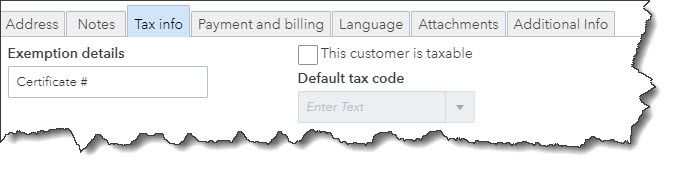
  • To whom you sell. Some customers (like nonprofit organizations) do not have to pay sales tax. You’ll need to edit their customer records to reflect this in QBO. Open a customer record and click the Edit link in the upper right. Click the Tax info tab and make sure there’s no checkmark in the box that says This customer is taxable. The Default tax code will be grayed out, and you can enter Exemption details in that field.

QuickBooks tips

Customer records for exempt organizations should contain details for that exemption. You’ll need to see their exemption certificate or at least know its official number.

Intuit now offers a revamped version of QuickBooks Online’s sales tax features.

At some point, you’ll be asked if you want to switch to the new, more automated system. The actual mechanics of the process are simple, but you’ll be moving historical and in-process data to a new structure. If you have sales tax set up right now and your situation is at all complicated, you’re going to want our help with the transition.

This enhanced feature only supports accrual accounting.

You can combine individual tax rates.

If you are required to pay city, county, and state sales tax rates for a particular customer, for example, you can create a Combined tax rate that contains all of the individual components. The customer will only see the total on an invoice or sales receipt, but QuickBooks Online will track each one accordingly for payment and reporting purposes.

QuickBooks tips

You can combine sales tax rates in QuickBooks Online (image above from current Sales Tax Center in QuickBooks Online, not the enhanced one).

Product and service records should contain sales tax information.

This is another area that will require some research. Just as some services are subject to tax, some products are not (like groceries in Arizona). So, you’ll need to find out what the rules are for what you sell. You can find this information on the website of the state’s Department of Revenue (sometimes called the Department of Taxation).

Once you know, you can record that status in QuickBooks Online. Open a product record by going to Sales | Products and Services and clicking Edit in the Action column or create a new one by clicking New in the upper right. Scroll down to Sales tax category in the record. You can choose between Taxable – standard rate and Nontaxable.

There’s a third option here: special category. This gets complicated. We can help you determine whether it applies to you.

QuickBooks Online tracks the sales tax you owe.

You can see what you owe to each agency by running the Sales Tax Liability Report, and record payments when you’ve made them. Summary and detail versions of the Taxable Sales report are also available.

Once you get sales taxes set up in QuickBooks Online, it’s easy to add them to the relevant sales forms. Getting to that point, though, takes time, study, and careful attention to detail. If you’re getting ready to sell, or you’re already selling and struggling with sales taxes, let us know. We can schedule an initial consultation to see how we can be of assistance.

Filed Under: QuickBooks

5 Ways to Lower Your SUTA Tax Rate

July 21, 2020 by admin

Close up of female accountant or banker making calculationsAn employer’s SUTA tax rate is susceptible to fluctuation. If yours is escalating, contrary to popular belief, you actually might be able to reduce it! Check out these five strategies to curb your SUTA tax rate.

Because the State Unemployment Tax Act – or SUTA – tax is mandatory, you may think you have no control over your SUTA rate. But to some extent, you do. The first thing to remember is that each state sets its own criteria for state unemployment tax, and rates vary by employer.

Typically, new employers are assigned a standard “new employer” rate. Over time, they receive an “experience rating,” which can be higher or lower than the new employer rate. The experience rating mainly depends on how many former employees have drawn unemployment benefits on the employer’s account. The more benefits claimed on an employer’s account, the higher its SUTA tax rate. Other determinants may include whether the employer is in the construction industry and the employer’s payroll size.

You may be powerless against some of these influencers – such as your business’s age and industry — but there are other ways to lower your SUTA rate. Here are five tactics.

1. Hire only when needed

Letting employees go because you don’t need them anymore likely renders them eligible for unemployment benefits. If they file for unemployment benefits, your SUTA rate is likely to increase. So, make sure you truly need an employee before hiring him or her.

2. Help your employees succeed

Employees terminated for gross misconduct typically do not qualify for unemployment benefits. However, employees fired for poor performance – such as due to lack of skills – may be eligible. To reduce the likelihood of terminating employees for poor performance, give them the resources they need to succeed, including proper tools and training.

3. Use independent contractors

You can avoid unemployment claims by legally hiring independent contractors instead of employees. If you decide to take this route, ensure all mandatory requirements for independent contractor status are met, including the Internal Revenue Service’s “right-to-control” test and applicable state tests.

4. Contest dubious unemployment claims

Dubious unemployment claims may involve former employees providing the state workforce agency with false information to obtain benefits or filing a claim even though they were rightfully terminated for gross misconduct. Before you fight an unemployment claim, consult with an unemployment benefits expert to gauge the strength of your case. Also, make sure you have supporting documents to back up your version of events.

5. Make voluntary contributions

Many states allow employers with an experience rating to voluntarily make a “buydown” payment, which cancels all or part of the benefits charged to their account, thereby reducing their SUTA tax rate.

More tips

Consider alternatives to layoffs, such as reducing employees’ work hours via your state’s work-sharing program.

Offer departing employees a solid severance package as well as outplacement services to help them quickly find a job. This way, they will be less inclined to rely on unemployment benefits.

Keep an eye on your SUTA tax rate. If it’s spiking for unknown reasons, contact your state’s workforce agency for an explanation.

Want to learn more about our small business accounting services? Give Jeff Martin a call at 912-634-7722 today to schedule your free initial consultation.

Filed Under: Business Tax Articles

Social Security: Note the Key Changes for 2020

June 17, 2020 by admin

M. Jeffery Martin, CPA, LLCThe Social Security Administration has released new numbers for those paying Social Security and those collecting it. Check out the new maximum taxable earnings amount as well as COLA and other key adjustments.

Every year, the Social Security Administration takes a fresh look at its numbers and typically makes adjustments. Here are the basics for 2020 — what has changed, and what hasn’t.

First, the basic percentages have not changed:

  • Employees and employers continue to pay 7.65% each, with the self-employed paying both halves.
  • The Medicare portion remains 1.45% on all earnings, with high earners continuing to pay an additional 0.9% in Medicare taxes.
  • The Social Security portion (OASDI) remains 6.20% on earnings up to the applicable taxable maximum amount — and that’s what’s changing:

Starting in 2020, the maximum taxable amount is $137,700, up from the 2019 maximum of $132,900. This actually affects relatively few workers; the Society for Human Resource Management notes in an article that only about 6% of employees earn more than the current taxable maximum.

Also changing is the retirement earnings test exempt amount. Those who have not yet reached normal retirement age but are collecting benefits will find the SSA withholding $1 in benefits for every $2 in earnings above a certain limit. That limit is $17,640 per year for 2019 and will be $18,240 for 2020. (See the SSA for additional information on how this works.)

Cost-of-living adjustments

Those collecting Social Security will see a slight increase in their checks: Social Security and Supplemental Security Income beneficiaries will receive a 1.6% COLA for 2020. This is based on the increase in the consumer price index from the third quarter of 2018 through the third quarter of 2019, according to the SSA.

A detailed fact sheet about the changes is available on the SSA site.

Filed Under: Business Tax Articles

Tax-Deductible Expenses: Are You Recording All of Them?

May 19, 2020 by admin

QuickBooks - M. Jeffrey Martin, CPA, LLCMake income tax preparation easier by tracking all the deductions you can take.

You’ve heard it said before: Tax planning should be a year-round process. It’s so true. Your life will be a lot easier early next year when all your tax forms start rolling in.

Forms like 1099s and W-2s do a lot of the tracking for you. You only need to transfer data over to your IRS tax forms and schedules. But what about the daily stuff, the expenses you incur as a part of your workday that no one else is documenting? There are a lot of tax-deductible costs that can really add up when it’s time to file.

The IRS has two criteria for evaluating the validity of business expenses. First, is it ordinary? Is it something that other companies in your trade or profession would commonly buy? Second, is it necessary? Is it “…helpful and appropriate?”

Warning: Some expenses that you think might be deductible are not. Obviously, you can’t claim the costs of personal items. The IRS specifies two other types of expenses that can’t be deducted: Capital Expenses and those used the calculate the Cost of Goods Sold. Questions? Ask us.

Pulling together all that numbers required for the IRS Schedule C can be challenging. Let us know if you have questions.

Here are some examples of expenses that you might not consider, but which should be recorded as they occur so you don’t forget about them come tax time.

Advertising and promotion

Some of these expenses are obvious. For example, you might report printing costs for brochures, ad space bought, and postage for mailers and other business correspondence. But there’s much more that fits into this category. Think about everything you do that helps promote your business, like expenses related to:

  • Business cards
  • Team sponsorships
  • Your website (including startup and maintenance fees)
  • Graphic design
  • Workshops/webinars

Insurance

Do you have any kind of business insurance, like liability or malpractice? Your premiums are deductible.

Car and truck expenses

Understandably, you can only deduct expenses for miles driven for business purposes. If you have a vehicle—either owned or leased—that you also use for personal driving part of the time, you’ll need to track those two separately.

There are two options for calculating business mileage: Actual Expenses and Standard Mileage. To calculate the latter, you’d multiple the number of business miles driven by 53.5 cents for tax year, then add tolls and parking fees. The Actual Expense method is more complicated; it involves many costs, and recognizes depreciation of the vehicle. Check with us if you’re planning to claim expenses for a car or truck, as there are additional rules governing this deduction.

Postage and office supplies

Yes, they’re deductible if you need them for your business.

Meals and entertainment

Familiarize yourself with the rules for this one. They’re complicated, and the IRS looks closely at such deductions.

Business use of your home

Ditto. There are all kinds of regulations, restrictions, and exceptions here, even if you use the simplified method that the IRS introduced a few years ago. Further, the home office deduction can be an audit red flag.

The rules are very specific and very rigid. For example, even if you use your home’s land line for business, you can’t deduct it. Add another line for business, and you can.

Professional and legal fees

If you pay an individual or firm for services provided to help you operate your business, those fees are often deductible. This includes lawyers, accountants, and tax preparers, of course, but as always, there are exceptions. You can’t usually, for example, deduct attorneys’ fees if you were getting legal help to buy business assets.

Dealing with Details

As you can see, there are many allowable business expenses that require meticulous recordkeeping. You can, of course, do this on paper or in a spreadsheet. There are cloud-based applications specifically designed for this purpose. If you’re interested in checking these out, let us know. We’re always available to help you plan for future tax filings.

Filed Under: QuickBooks

  • « Previous Page
  • Page 1
  • …
  • Page 10
  • Page 11
  • Page 12
  • Page 13
  • Page 14
  • Page 15
  • Next Page »

Primary Sidebar

Search

Archives

  • January 2026
  • December 2025
  • November 2025
  • October 2025
  • September 2025
  • August 2025
  • July 2025
  • June 2025
  • May 2025
  • April 2025
  • March 2025
  • February 2025
  • January 2025
  • December 2024
  • November 2024
  • October 2024
  • September 2024
  • August 2024
  • July 2024
  • June 2024
  • May 2024
  • April 2024
  • March 2024
  • February 2024
  • January 2024
  • December 2023
  • November 2023
  • October 2023
  • September 2023
  • August 2023
  • July 2023
  • June 2023
  • May 2023
  • April 2023
  • March 2023
  • February 2023
  • January 2023
  • December 2022
  • November 2022
  • October 2022
  • September 2022
  • August 2022
  • July 2022
  • June 2022
  • May 2022
  • April 2022
  • March 2022
  • February 2022
  • January 2022
  • December 2021
  • November 2021
  • October 2021
  • September 2021
  • August 2021
  • July 2021
  • June 2021
  • May 2021
  • April 2021
  • March 2021
  • February 2021
  • January 2021
  • December 2020
  • November 2020
  • October 2020
  • September 2020
  • August 2020
  • July 2020
  • June 2020
  • May 2020
  • April 2020
  • March 2020
  • February 2020
  • January 2020
  • December 2019
  • November 2019
  • October 2019
  • September 2019
  • August 2019
  • July 2019
  • June 2019
  • May 2019
  • April 2019
  • March 2019
  • February 2019

Categories

  • Business Best Practices
  • Business Tax Articles
  • Estate and Trusts
  • Individual Tax Articles
  • Investment
  • M. Jeffrey Martin CPA News
  • Payroll Tax
  • QuickBooks
  • Retirement
  • Uncategorized

Copyright © 2020 · https://www.ssicpa.com/blog